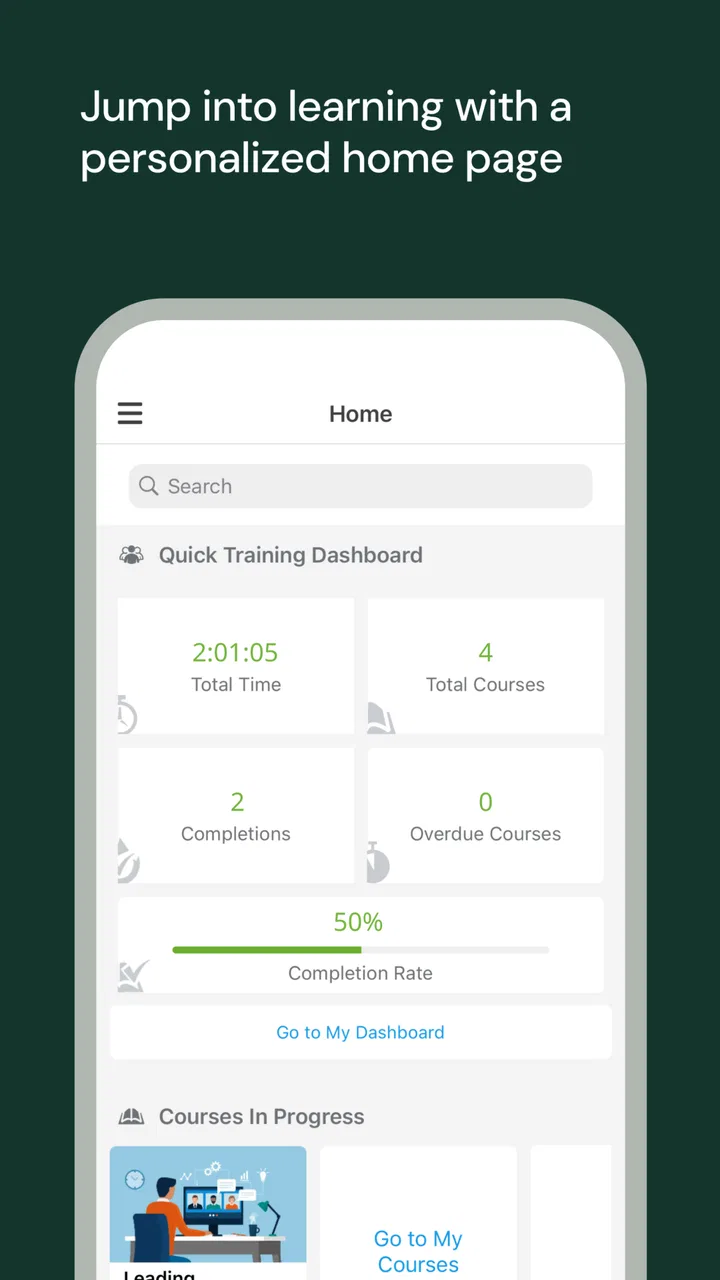
UKG Pro Learning
- 3.0
- Rating
- 100.00K
- Installs
- Free
- Price

 Analysis by App-foxy
UKG Pro Learning is the kind of business app you usually open with a clear task in mind: finish assigned training, check learning material, or keep up with workplace development from a phone. I found it more useful as a companion to an organization’s learning setup than as a complete learning platform on its own. That distinction matters, because the quality of the experience depends heavily on how an employer has configured access and assigned content.
Developed by UKG, Inc., this free app sits in the business category and is aimed at people using the UKG Pro Learning environment through mobile devices. It is available for everyone from an age-rating perspective, has passed the 100K-plus install mark, and currently appears as version 12.2.1 for devices running Android 8.0 or later. Its average rating is 3.0 from more than 300 ratings, with over 100 written reviews, which suggests a mixed experience rather than a universally smooth one.
My overall impression is that the app makes sense when your employer already relies on UKG Pro Learning and you want a more convenient way to reach training away from a desk. It is less convincing if you are looking for a public course marketplace, a personal study planner, or a standalone education app. The most important question is not whether it has a long list of consumer-friendly extras; it is whether it connects cleanly to your organization’s learning workflow.
You May Also Like

 Blood Strike: 2.5 Anniversary
Blood Strike’s Loadouts Turn Every Drop Into a Tactical Gamble
A close look at Blood Strike’s custom loadouts: how fast access to signature weapons reshapes its battle royale rhythm, rewards preparation, and narrows the gap between fights.

 Pandora - Music & Podcasts
Pandora’s Music Is Easy to Start, but Harder to Recover
Pandora’s strength is its low-effort path from a seed to a station. Its weak spot is how much confidence it asks you to place in connection, setup, and quiet recovery.

 8 Ball Pool
8 Ball Pool Is Built on Rivalries, Rematches, and Routine
A close look at the rivalries, rematches, shared routines, and unanswered safety questions that turn a quick pool match into a persistent mobile community.

 Samsung Music
Samsung Music’s Quiet Strength Is Playing What You Already Own
Its reach comes less from spectacle than from dependable access to a personal library. That simplicity is both the app’s strongest retention engine and its ceiling.

 AccuWeather: Weather Radar
AccuWeather Review: A Quick, Clear Forecast for Everyday Decisions
For everyday plans, the best forecast is the one you can understand quickly. AccuWeather makes rain timing, radar, and local conditions easy to act on, with a few trade-offs.

 Hill Climb Racing
Why Hill Climb Racing Still Turns Crashes Into One More Run
A tiny car, a bumpy hill and one more upgrade: Hill Climb Racing keeps resurfacing because its simple chaos makes every near-miss feel personal.
More From Our News Desk



Getting past the first points of friction
I find the first hurdle with UKG Pro Learning is often understanding what the app can control and what belongs to your workplace’s learning setup. This section looks at how I would make the opening experience easier to interpret, so a login or empty screen does not immediately become a dead end. That distinction also sets up the practical question of how the app fits into an ordinary workday.
Why the first launch can feel less straightforward
The most common source of confusion with a workplace learning app is the difference between downloading it and actually being authorized to use it. Installing UKG Pro Learning does not, by itself, create a personal course library. Your employer or training administrator normally determines the account path, the available learning content, and the access details you need. If you open the app expecting to register like you would with a general-purpose learning service, the first screen may feel unhelpful.
I would begin with the exact sign-in instructions supplied by your workplace rather than trying random email addresses or repeatedly resetting a password. Some organizations use a particular company identity, while others direct staff through an established workplace login process. The practical lesson is simple: treat the app as the mobile doorway to an existing training account, not as an independent service that can be fully configured from the phone.
This is also where the app’s modest rating becomes understandable. A failed login can look like an application problem even when the underlying issue is account provisioning, an expired workplace relationship, or an incorrect sign-in route. A user who has been enrolled correctly may find the app perfectly adequate, while someone whose account has not been activated may never get far enough to judge the learning experience itself.
Checks worth making before blaming the app
Before troubleshooting deeply, I would confirm three basics. First, check that the phone meets the minimum Android requirement. Second, verify that you are using the current UKG Pro Learning app rather than relying on an old installation that has been carried across several device changes. Third, ask your training or human-resources contact whether your account is active and whether the expected courses have actually been assigned.
These checks sound obvious, but they prevent wasted time. If an employee can sign in but sees an empty or incomplete learning area, that does not automatically mean content failed to load. It may simply mean the organization has not assigned the course yet, the assignment is tied to a different account, or the employee is looking in the wrong part of the learning environment. The useful distinction is between access trouble and content availability.
I would also test the app on a reliable connection before drawing conclusions. A weak mobile signal can make a training item appear stalled, especially when the phone is switching between networks. If the same screen behaves normally on a stable connection, the app may not be the real source of the interruption. This is a safer and more useful first step than immediately reinstalling everything.
A setup routine that saves time later
My preferred setup routine is deliberately boring. Install the app, use the organization’s official sign-in instructions, complete one short learning task if one is available, and then close and reopen the app. That small test helps reveal whether the account is genuinely working or whether the first successful screen was only a temporary session.
After signing in, I would make a note of where assigned learning appears and how completed work is represented. In a workplace setting, this matters more than cosmetic customization. If you know exactly where to check for assigned items and how to confirm that a lesson has registered, you are less likely to repeat a course unnecessarily or assume that your manager cannot see your progress.
It is also worth keeping the app’s version current. The installed version is 12.2.1, and using the current release is a sensible way to avoid problems already addressed by later maintenance. I would not promise that updating fixes every sign-in or content issue, because workplace systems involve more than the mobile client, but it removes one avoidable variable from the investigation.
Using it in a real workday
Accessibility is not only about what appears on screen; it is also about when, where, and how comfortably someone can use it. I’ll look at the trade-offs of relying on a phone for workplace learning, including situations where a quick mobile check helps and where another screen or support route may be the better choice.
Where the mobile format genuinely helps
The strongest use case is short, practical learning during gaps in the day. Imagine a retail employee waiting for a shift to begin, or a new office worker completing required material during a commute break. A phone is easier to reach than a desktop, and the app can make training feel less tied to a particular workstation. That convenience is valuable when the alternative is postponing every lesson until the user is back at a company computer.
I would especially recommend it to employees who already know what they need to complete. A manager says that a particular training item is due, the worker opens the app, locates the assigned material, and works through it without needing a full desktop session. In that situation, the app’s role is clear and useful: it shortens the path between a workplace requirement and the moment the employee can act on it.
There is a less obvious benefit to using the phone as a second access point. If a desktop session is interrupted by a meeting or a shared workstation becomes unavailable, the employee has another way to continue checking learning tasks. That does not mean every activity will be equally comfortable on a small display, but it can prevent training from becoming dependent on one physical location.
Where mobile learning becomes awkward
A phone is not automatically the best screen for every training task. Reading dense material, comparing detailed instructions, or taking notes while studying can be more tiring on a small display than on a laptop. If your learning assignment requires concentration rather than a quick review, I would use the larger screen when that option is available and keep the mobile app for checking progress or handling shorter sessions.
This is an important trade-off: mobile access improves availability, but it does not turn a phone into a full desktop replacement. People who expect a polished consumer-learning experience with a broad personal catalog may find the app too dependent on workplace assignments. That is not necessarily a defect in its intended role, but it does mean the app is a poor fit for someone choosing courses independently.
I would also avoid treating the app as a general document archive. Its value comes from its connection to the UKG Pro Learning environment used by an organization. If your goal is to store personal notes, build a private curriculum, or compare courses from unrelated providers, a dedicated note-taking or education platform will likely feel more natural.
Recovering when a session goes wrong
When a lesson appears stuck, I would use a measured recovery sequence. First, wait briefly and check whether the connection has changed. Next, leave the affected screen and reopen it rather than tapping repeatedly. If that does not help, close and relaunch the app. Repeated taps can create uncertainty about whether an action was accepted, while a clean restart gives you a clearer result.
If the problem affects only one learning item, record its name and the point where it stopped. Then try another assigned area, if one is available. This simple comparison is useful: if other material opens, the issue may be tied to that particular item or its configuration rather than the entire app. If nothing loads, the problem is broader and should be reported with the account and connection details your workplace support team needs.
For a completion that seems not to have registered, I would avoid immediately repeating the entire lesson. First reopen the relevant area, look for a changed status, and allow time for the account to reflect the action. If the status remains wrong, contact the training administrator and explain exactly what you completed and what the app displays. A precise report is much more helpful than saying only that “the app failed.”
Reinstalling can be a last resort for a persistent local problem, but it should not be the first response to missing assignments or rejected credentials. Reinstallation cannot create an account, restore an employer-side assignment, or correct a permission decision made outside the phone. It may also add another login step, so I would use it only after simpler checks have failed.
Recognizing problems that are outside the app
Workplace learning systems have several moving parts. The mobile client is only one of them. Your organization’s account setup, assigned content, sign-in configuration, network, and support process can all affect what you see. This is why two colleagues can install the same app and report very different results without either person misunderstanding the product.
If you can sign in but cannot find a course that a supervisor mentioned, ask whether the assignment was made to the correct account and whether it is available to your role. If your password works elsewhere but not here, confirm that the organization expects the same credentials for this learning service. If the app opens but a particular lesson is unavailable, give support the course name and the exact message rather than assuming the entire installation is broken.
Privacy and workplace expectations also deserve practical attention. Because this is a business learning tool, I would use the account and device arrangement approved by your employer, especially when completing required training. I would not assume that personal notes, screenshots, or unfinished work are handled the same way as they would be in a private study app. The safest habit is to follow your organization’s instructions for training records and support requests.
How it compares with familiar alternatives
Compared with a public learning marketplace, UKG Pro Learning is narrower but more relevant when your employer already uses it. A marketplace usually helps you browse and choose from courses on your own. This app is better understood as a controlled workplace channel, where the organization decides what learning belongs in your account. If choice and independent discovery are your priorities, another category of app will suit you better.
Compared with a desktop-only corporate portal, the mobile version has a clear convenience advantage. You can reach training without sitting at a company computer, which is useful for distributed teams and employees moving between locations. The compromise is screen size and the possibility that some tasks feel less comfortable on a phone. I see it as a practical second doorway rather than a reason to abandon larger-screen access entirely.
Compared with a simple file-sharing service, the app is more appropriate when training needs to be connected to an employee’s workplace learning account. A folder of documents may be easy to browse, but it does not necessarily give the same structured route through assigned development material. On the other hand, if your organization only needs to distribute occasional PDFs or videos, a simpler tool may feel faster and less dependent on account configuration.
Who should use it, and who should skip it
I would recommend the app to employees whose organization already uses UKG Pro Learning, especially those who need to complete training away from a desk. It is also a reasonable choice for managers or team members who want a convenient mobile route to assigned learning rather than waiting for access to a desktop portal.
I would skip it if you are looking for courses to buy or browse independently, a personal language-learning program, or a general study planner. The free price is attractive, but free installation does not turn it into an open course catalog. Its usefulness depends on having the right workplace relationship and learning assignments behind the login.
People with older Android phones should check compatibility before planning around it, since the minimum operating system is Android 8.0. Anyone who strongly prefers reading and studying on a large monitor may also be happier using the broader workplace learning experience on a computer when possible, keeping the app for quick access rather than intensive sessions.
My practical verdict
After looking at the app through the lens of everyday workplace use, I see UKG Pro Learning as a focused utility rather than an exciting all-purpose learning product. Its best quality is access: it can put employer-directed training closer to the moment when an employee has time to complete it. That is a meaningful improvement over a process that requires returning to a specific desk or office.
Its main weakness is the amount of confusion that can arise around setup. A missing course, failed login, or incomplete status may involve the organization’s account or learning configuration rather than the phone application. Users who understand that boundary will have a much easier experience. Users who expect the app itself to manage enrollment and solve every account issue may become frustrated quickly.
The public response, with a 3.0 average from more than 300 ratings, supports my balanced view: this is not a universally effortless app, but the rating also should not be read without considering its workplace dependency. For the right employer and account, it can be a useful mobile extension of training. For everyone else, it is unlikely to offer enough independent value to justify choosing it over a conventional education app.
My recommendation is straightforward: install it when your organization specifically directs you to use UKG Pro Learning, confirm your account and assignments before troubleshooting, and use a stable connection for important training sessions. If your workplace already runs its learning process through UKG, the app is worth having; if you need a standalone learning library, choose a different tool.
FAQs for UKG Pro Learning
01What is UKG Pro Learning used for?
UKG Pro Learning is a workplace learning platform designed for employee training and professional development. It allows organizations to provide courses, onboarding materials, compliance lessons, videos, assessments, and other educational resources in one place. Employees can use the app to access assigned learning, review progress, and complete training from a mobile device or supported web browser.
02Do I need a company account to use UKG Pro Learning?
Yes, UKG Pro Learning is generally intended for employees, contractors, or other users invited by an organization that uses the UKG learning service. You normally need valid company credentials or an invitation before you can sign in. Downloading the app alone does not create independent access, so contact your employer’s HR or IT department if you do not know your login details.
03Can I complete courses and training from my phone?
In most cases, the app lets you access assigned learning from a compatible Android or iOS device. Depending on how your employer configured each course, you may be able to watch lessons, read materials, take quizzes, and mark activities as complete while away from a computer. Some content or specialized features may still require a desktop browser.
04Does UKG Pro Learning work offline?
Offline availability depends on the organization’s configuration and the specific learning content. Some materials may be available for temporary offline viewing, while interactive activities, assessments, progress synchronization, or video streaming may require an internet connection. Before starting important mandatory training, connect to a reliable network and allow the app to synchronize your completed activities.
05Is UKG Pro Learning free to download and use?
The app may be available to download without a separate purchase, but access is normally provided through an employer or organization with a UKG Pro Learning subscription. Your company determines which courses, features, and content are available to you. Mobile data charges may also apply when streaming videos or downloading training materials, depending on your carrier plan.
Pros
- Centralizes courses
- certifications
- and required workplace training.
- Progress tracking makes it easy to monitor completed and pending learning.
- Supports mobile access for studying during commutes or away from a desk.
- Course reminders can help employees meet mandatory training deadlines.
- Useful for organizations managing structured employee development programs.
Cons
- Some features may be unavailable unless enabled by the employer.
- Login issues can occur when company authentication systems are misconfigured.
- The interface may feel more functional than engaging for casual learners.
- Large courses or videos may use significant mobile data and storage.
- Performance and content quality can vary between different employers.

UKG Pro Learning
Gallery